Automatic pixelation of faces and license plates in videos
DSGVO-Pixeler detects sensitive areas, pixelates them automatically, and delivers consistent outputs. Ideal for YouTube, screenshots, datasets, or support documentation.
Why DSGVO-Pixeler?
Visual material is subject to strict privacy requirements. DSGVO-Pixeler speeds up your workflow and helps anonymize sensitive information reliably — with a modern flow that fits existing pipelines.
Pro tip: Use it for reports, internal demos, or training data.
Main demo: What the Pixeler can do
Benefits that show immediately
Privacy-focused
Supports compliant workflows with automatic detection and pixelation.
Flexible & extensible
Works as a CLI tool or a building block in automated pipelines.
Clear outputs
Structured outputs for approvals, audits, and reviews.
Examples: Images and videos
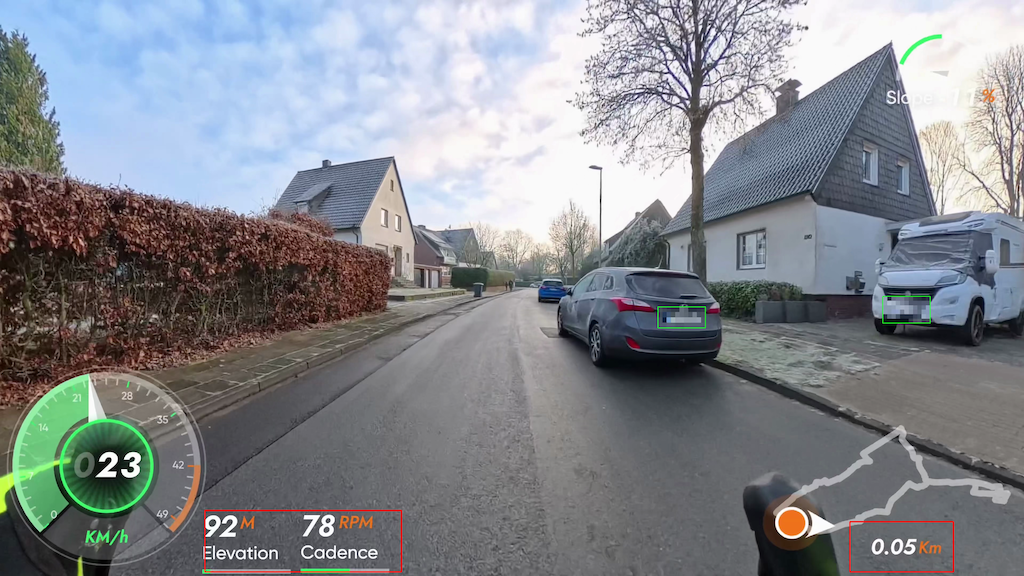
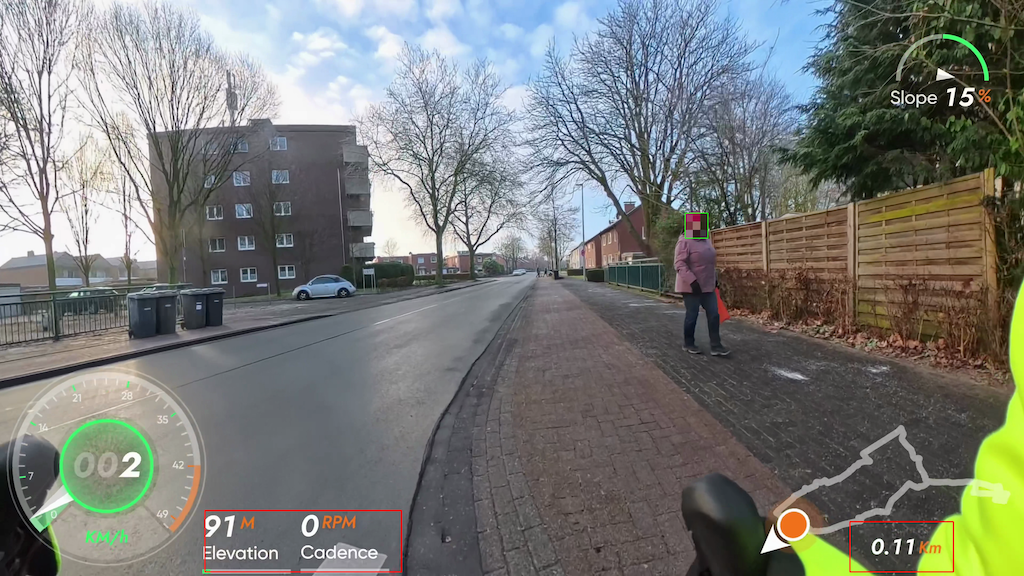
Capabilities & highlights
Detection
License plates and faces are enabled by default and can be toggled individually.
Mosaic, not blur
True pixel mosaic with separate strengths for plates and faces.
Tiling & tracking
Better detection of small details via tiling, optional tracking to reduce flicker.
No-pixel zones
Define areas that should never be pixelated — ideal for UI elements.
Snapshots
Automatic JPEG snapshots at configurable intervals.
Presets
Save settings as presets and reuse them for new projects.
All features at a glance
- License plate and face detection (YOLOv8)
- Mosaic pixelation with separate strengths
- Safety padding via
--pad - Tiling for small objects (
--tiling) - Tracking to reduce flicker (
--no_track) - No-pixel zones with debug overlay
- Snapshots on intervals + fixed size
- Performance tuning via
work_wandimgsz - ffmpeg encoding including audio control
- Bitrate handling (
autoor fixed) - Save and load presets
- Logging with progress, ETA, and FPS
Workflow in three steps
1. Choose media
Define the source or load a set of images or videos to process.
2. Analyze & pixelate
DSGVO-Pixeler detects sensitive areas and pixelates them automatically.
3. Export & share
Get ready-to-use results for reports, support, or training.
Quick start (short)
Setup
Provide Python 3.10+, ffmpeg, and a license plate model in models/plates/.
Install
Create a virtual environment, activate it, and install requirements.txt.
Run
Execute: python dsgvo-pixeler.py --input input.mp4 --output output.mp4 --weights models/plates/best.pt
Output
The output video lands in your target folder, optionally with debug overlays and snapshots.
Requirements & installation
Requirements
- Python 3.10+
- ffmpeg (e.g. via Homebrew)
- License plate model as
.ptinmodels/plates/ - Optional: face models in
models/faces/
Installation (short)
python3 -m venv .venvsource .venv/bin/activatepip install -U pippip install -r requirements.txt
FAQ
Are multiple models processed in parallel?
No, they run sequentially — which is more stable and often faster.
Why is tracking disabled when tiling?
Across tiles, object IDs are inconsistent, so tracking is disabled automatically.
What is the default value for tiling?
Default is --tiling 2 (2x2 grid) for better detection of small plates.
Which models are used by default?
All .pt files in models/plates/ and models/faces/ are used automatically.
How do I remove audio?
Use --no_audio to export the output video without an audio track.
How do I adjust pixel size?
Set --blocks_plates and --blocks_faces (higher values = larger pixels).
Why does tiling take much longer?
YOLO runs on every tile, which increases compute time but improves small-object detection.
More real-world examples
Minimal run (defaults)
python dsgvo-pixeler.py --input source.mp4H264 compatible + fixed bitrate
python dsgvo-pixeler.py \\
  --input input.mp4 \\
  --output output_h264.mp4 \\
  --weights /path/to/plate_model.pt \\
  --codec h264 \\
  --bitrate 50M
License plates only
python dsgvo-pixeler.py --input input.mp4 \\
  --weights models/plates/best.pt --no_faces
Faces only
python dsgvo-pixeler.py --input input.mp4 \\
  --faces_weights models/faces/face1.pt --no_plates
Tiling + debug overlays
python dsgvo-pixeler.py --input source.mp4 \\
  --tiling 2 --debug_pixel --debug_no_pixel
Snapshots every 5 minutes
python dsgvo-pixeler.py --input input.mp4 \\
  --snapshot_every 5 --snapshot_size 1920x1080
Save & load presets
python dsgvo-pixeler.py --input source.mp4 --save_preset json\npython dsgvo-pixeler.py --input another.mp4 --load_preset source_presetReady for privacy-safe visuals?
Try DSGVO-Pixeler, integrate it into your workflow, and keep your media compliant.